Chained Trust Hijacking
Phishing emails are usually talked about like they are easy to spot, and a lot are. We can laugh at low-quality phishes when they tell us we can win $10,000 if we "click this link!" Constructing a convincing phishing attack used to take a lot of time and resources from the attackers.
Pretty obviously, LLMs have greatly enhanced the quality and production speed of these attacks. It used to take many human hours to get all of the correct pieces in place for these scams.
In this article, we are going to be analyzing a decent phishing attack. The email made it past Gmail’s security filters and landed in a CFO’s main inbox. However, Sieve, our email security tool, caught it. We will be going over how it evaded detection and the actual mechanism of the attack.
What the victim saw
Take a look at this email from the perspective of the CFO. I challenge you to find something wrong with this email:
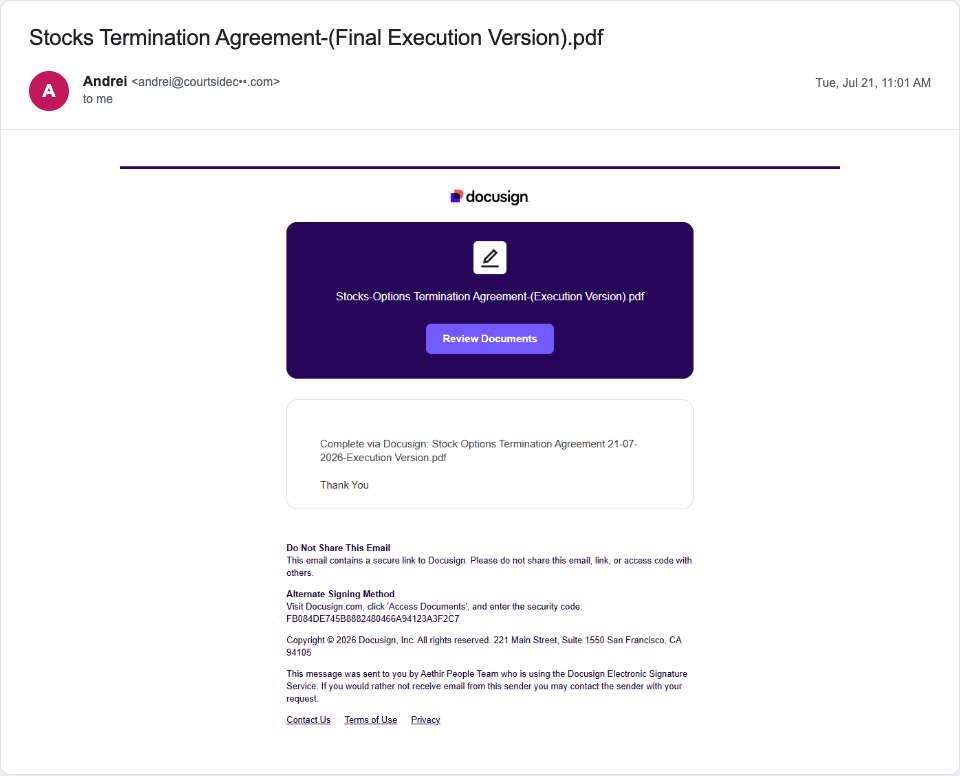
That was a trick! There is actually nothing wrong with the email format itself. The only red flag from this view is the sender. Typically people might think there are small visual cues to help them discern a phishing email, but in this case this is a perfect recreation of the Docusign format for this kind of email.
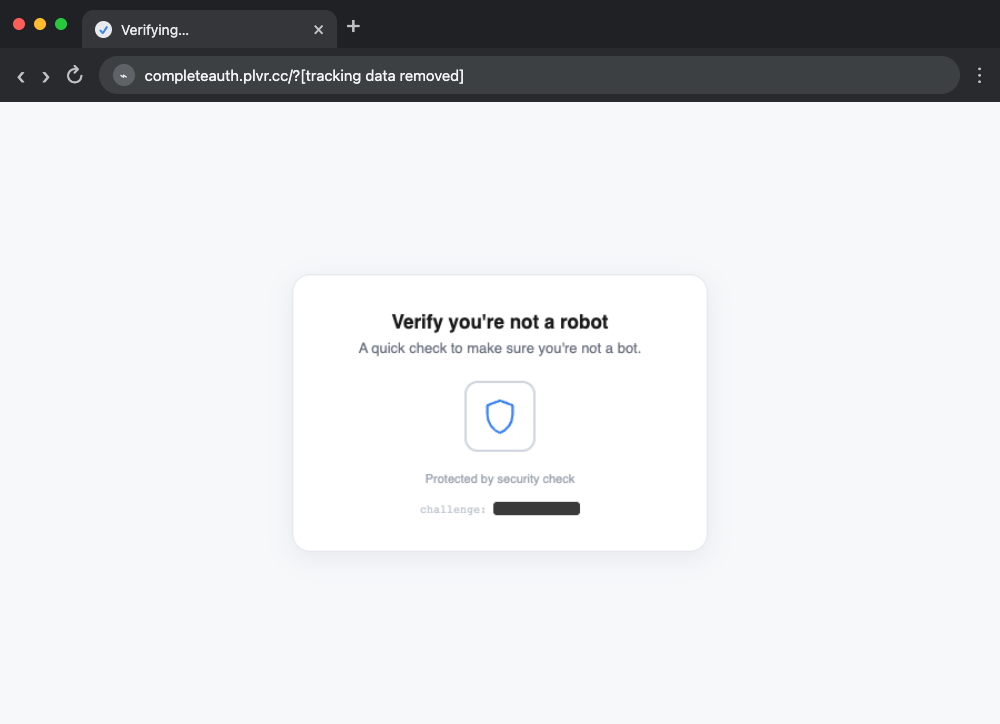
From here, when you click on the "Review Documents" button, it brings you to a CAPTCHA page, which you can click and get through with no problem.
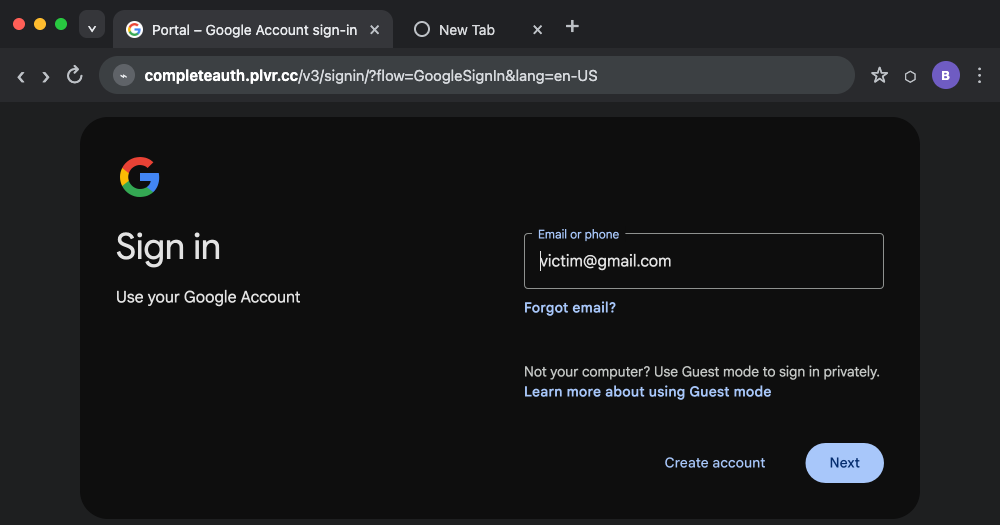
Finally, it brings you to a Google sign-in page, which conveniently has your email already filled in for you! This is the point of no return. If you enter your password and use 2FA, it will just sign you into Google, and bring you to the Google home page, and you'll be compromised. The attackers would now have stolen your password and temporary 2FA authenticated session meaning they have free rein over your account.
This is a pretty basic setup for a phishing attack, but at this point we have to figure out how did this even end up in the main inbox?
Evasion techniques
One of the best ways to evade detection is abusing known trust. If you
take a look at the domain, you can see it was sent from
andrei@courtsidecr.com.
From: andrei@courtsidecr.comReturn-Path: <…@eu-west-1.amazonses.com>
Authentication-Results: mx.google.com;
       dkim=pass header.i=@courtsidecr.comdkim=pass header.i=@amazonses.com
       spf=pass smtp.mailfrom=…@eu-west-1.amazonses.com
Courtsidecr.com is a real tennis coaching business based out of Costa Rica, and the domain has been registered since 2013. Taking a look at the .eml file headers, this domain passed DKIM and SPF, which both verify that the email was sent from the legitimate inbox "owner" and server infrastructure. Domain age and authentication combined present a story of trust that is hard to catch with basic filtering.
From: "Acme Corp via Docusign" <examplestring@docusign.net>
Authentication-Results: mx.google.com;
       dkim=pass header.i=@docusign.net
       spf=pass smtp.mailfrom=examplestring@docusign.net
       dmarc=pass header.from=docusign.net

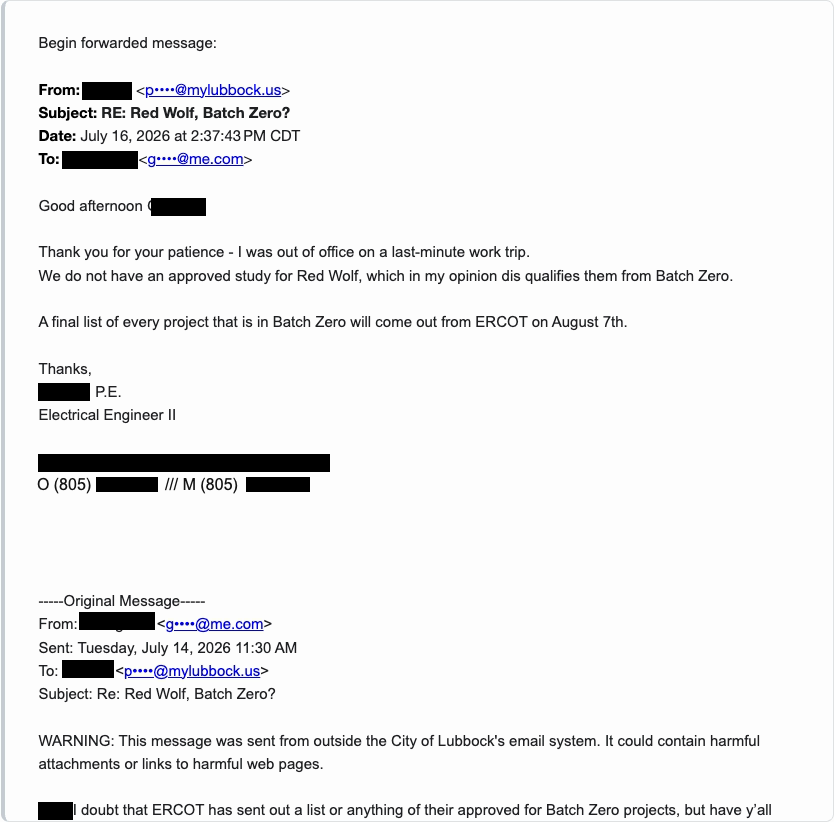
On long email threads you might sometimes press the 3 dots symbol: just to see the full thread. On this email, if you click it nothing happens, it just becomes blank space. This is another basic but effective evasion strategy.
If you scroll after hitting the 3 dots, you can actually see a full email conversation from two people on completely different domains talking about a utility project in Lubbock, Texas. The attackers copy and pasted this thread into this email so that the content filters would be tripped up and analyze this as a regular conversation, allowing the email to pass another inbox worthiness check.
Earlier, I was a bit misleading. The email itself actually isn't a copy of the standard Docusign styling. It is actually just an image of it. This email is not using HTML to design how it looks. All the attacker did was just take a screenshot of the standard Docusign format modified with information they wanted. This also helps evade filters, as the image is very small and not always run through text recognition tools.

When you click anywhere on this image, you are not sent directly to the page at the end. You first go through a tracking link set up with Postmark. A tracking link records that the link was clicked and then redirects your browser to its destination. In this case, the destination inside the first tracking link is another Postmark tracking link. This happens four times, and is intentionally done to evade Postmark and Google abuse detection.
After the fourth Postmark redirect, the browser lands on Esidra.so. Esidra is an abandoned Somali energy firm’s domain that the attackers hijacked and used as another forwarding step. The page on Esidra then redirects the browser to plvr.cc, the credential-collection domain. This chain makes the final destination harder for Google, Postmark, and automated scanners to reach because they must follow every redirect before they can see the malicious page at the end.
After clicking on the "Docusign" as a victim, you always land on the CAPTCHA page. But, we were doing this analysis from a remote sandbox, meaning that our IP address was attached to a datacenter. From a datacenter IP, this same link redirected us to a random blog every time you refreshed the page. This is done because most security crawlers run from known datacenter IPs so this helps filter them out from scanning the malicious page.

When we switched to doing analysis on a local sandbox, we also found that the redirect link from the image carries a lot of information presumably for the attackers' own internal telemetry like who clicked on their image in the email.
https://completeauth.plvr.cc/?[tracking parameters removed]&smn=[base64 recipient removed]If you try to remove this email or tracking information, it then repeats the blog redirecting system. But, we also found that you can just substitute the email encoding with a fake but properly formatted email address, it will let you through to the Captcha page! Both the IP filtering and link rotating make it hard for a crawler to just stumble upon the malicious page, further evading general infrastructure to flag down sites like this.
Now that we have made it to the Captcha page, it looks exactly like the ones you've clicked through a million times on other sites, a shield icon with a little spinner. None of that actually serves any purpose on this site.
What's actually happening is that your browser is executing a hash function (SHA-256) in the background with JavaScript.
All this is doing is filtering out rudimentary web scrapers that are unable to interact with the website. If you can not click this link or your scraper is unable to execute JavaScript, it will not advance you to the malicious page. While clicking a button is simple, at the scale many security scrapers have to run at, this feature is only reserved for domains or pages that already look suspicious.
Google Sign-in Page
The Google sign-in page actually deserves a section of itself because the way that it's executed makes this a bit annoying to analyze and also makes it look like a perfect disguise.
completeauth.plvr.cc
at the top.Apart from the domain at the top being different from the standard Google sign-in domain, I encourage you to once again try and find something wrong with this page. You might think that it fails on reset password or account recovery or two-factor authentication.
Surprisingly, this is actually the real Google sign-in page. This is hosted using Google resources, endpoints and assets. This makes this phish surprisingly dangerous.
This kind of attack is a Man-in-the-Middle (MITM) attack. When you sign in, your password is sent to the attacker's server (hosted behind Cloudflare), which forwards it to the real Google in the background and passes Google's response back to you. You can see the theft itself happen in Burp Suite: the highlighted request shows the password leaving your browser and landing on the attacker's domain.
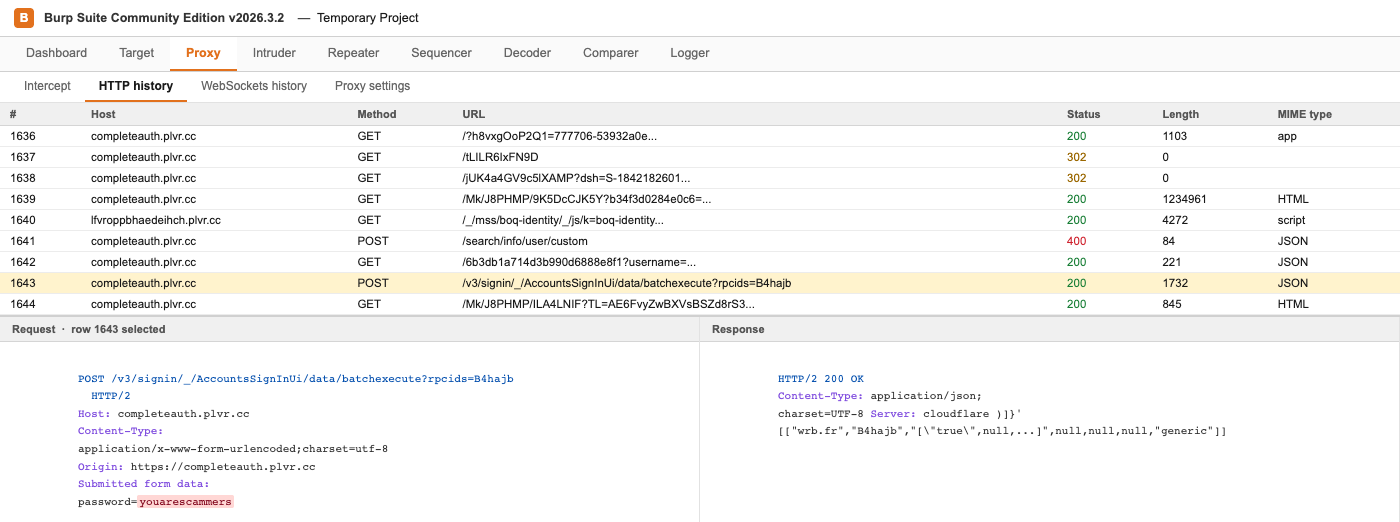
The reason that this is particularly dangerous is that this phish covers all ways the sign-in process could go wrong. Forgotten password, 2FA, CAPTCHA, all of it is handled by real Google infrastructure. The attackers have made it as easy as possible for you to enter in your details on their controlled page.
A note on our testing setup
One quick point: the cloned page still runs through Google's real sign-in backend, and Google itself kept demanding a CAPTCHA before it would accept the burner email, even from our own home network. Switching that same VM onto a phone hotspot made the CAPTCHA disappear. The likely reason is that by that point our home IP had already been hit with several scripted sign-in attempts during testing, and login-risk systems specifically watch for repeated attempts from one address in a short window. A phone hotspot gave us a fresh IP with no history attached to it, so Google's risk score reset.
Conclusion & Comments
The problem here is clear: every single piece of this attack was riding on previously established trust. Hijacked company email accounts, real services abused through Postmark, Google Sign-In, and Cloudflare. The message reached the inbox because each stage borrowed trust from a separate legitimate service. Nothing clearly exposed the attack until the final sign-in step, where the proxy captured the victim's password and session.
It is difficult to argue that this problem will improve on its own. Research on AI-assisted phishing found that automating the campaign can reduce an attacker's costs by more than 95% while matching or exceeding the success rate of human attackers. As these tools improve, targeted lures will become cheaper and faster to produce. Understanding how these attacks reuse trusted services and real sign-in flows can reduce that advantage.
The increasing volume of phishing emails is only one of many ways the human layer of cybersecurity will face more pressure in the coming months. At Snowfish Technologies, we plan to keep studying how these attacks evolve and how to protect the people they target.